


Signing in to eLABFTW

On this page, you’ll learn how to access eLABFTW.
Account creation and login for RWTH Members
User accounts can be created in several ways:
- A system admin creates an account within the specific team.
- A team admin creates an account within their team.
- Users create an account by signing into the ELN and selecting a team they wish to join. The team admins then receive a notification to verify the account.
To log in to the research instance of eLabFTW (opens in new tab)at RWTH Aachen University and to the education instance of eLabFTW (opens in new tab) at RWTH, select your institution from the drop-down list:
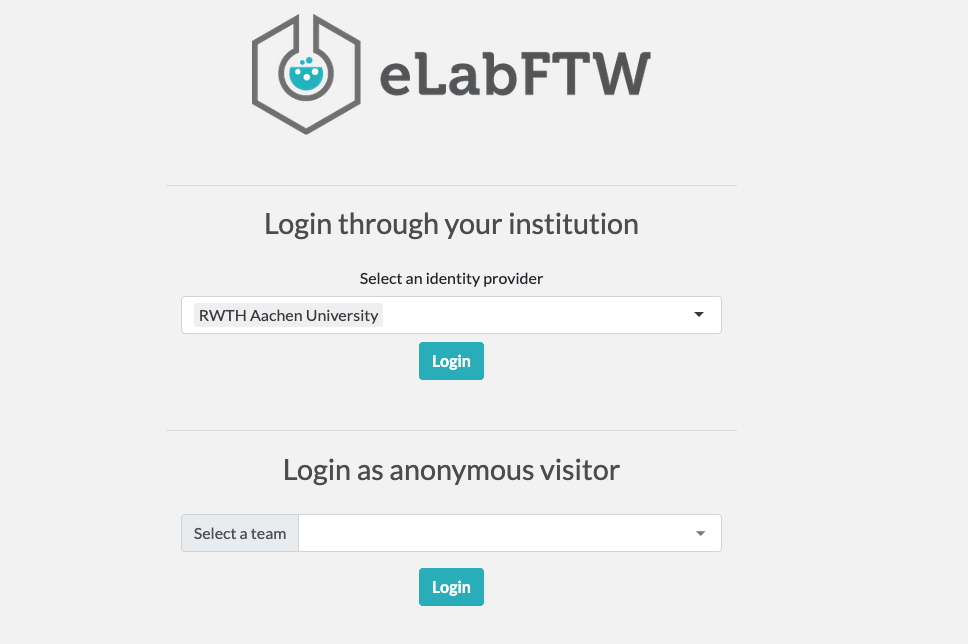
You will then be redirected to your local Shibboleth Single Sign-On (SSO) page. Enter your login credentials to log in to the ELN.
If an account has not been created in advance, Option 3 described above will occur automatically.
Option 3 is recommended for RWTH, as this prevents an email discrepancy between the account you created and the identity management.
Only RWTH email addresses are permitted in the ELN.
Your RWTH email address is stored by default in your RWTH SSO account. If you encounter any errors, please check your SSO email address in the IdM Self-Service (opens in new tab).
If it is an RWTH address and you are unable to create an account, please contact the IT ServiceDesk (Send an email to:) via email and provide the email address in question.
If you would like to change your email address for your RWTH Single Sign-On account, you can find instructions on the page Change the email address for your single sign-on account.
Login for anonymous users
The research instance at RWTH Aachen University allows anonymous users to log in. Only content that logged in users have explicitly allowed to be viewed by anonymous users is available with read-only permissions.
To access this content, select the team you wish to log in to at the bottom of the login page and click Log In.
If you have received a link to an entry, you do not need to log in, simply click the link.
For more information on enabling anonymous access, see the official eLabFTW documentation (opens in new tab).
Registration for external users
The ELN is connected to the research infrastructure via the DFN-AAI federation. If your institution is part of this federation, you can use the service as a collaborating research partner.
If your institution is not listed in the dropdown menu, please ask your team admin to contact the IT ServiceDesk (Send an email to:) via email to have it added.
Your home institution may need to enable access by activating the following attributes for the service provider on the login page (opens in new tab):
- pairwise-id
- sn
- eduPersonScopedAffiliation
- givenName
Login for external users is not yet available for the educational instance (opens in new tab). If you require this feature, please contact the IT ServiceDesk (Send an email to:) via email.
